
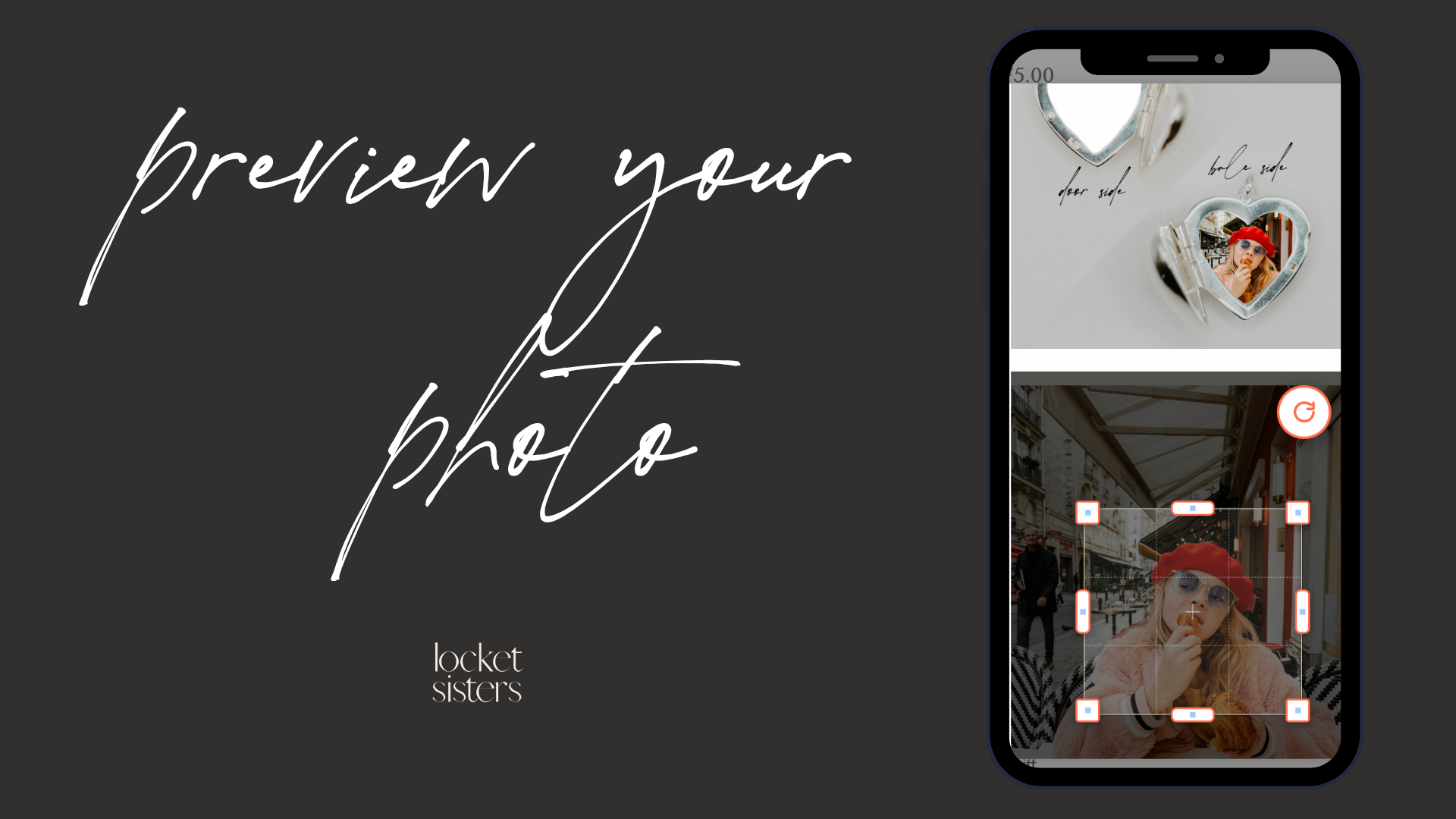
How to Use the Photo Preview Tool by the Locket Sisters
It's simple: First, find a locket you want to explore by browing here. Upload your photo by clicking "UPLOAD PHOTO" and then shift the edges of the shape around your image. You can:
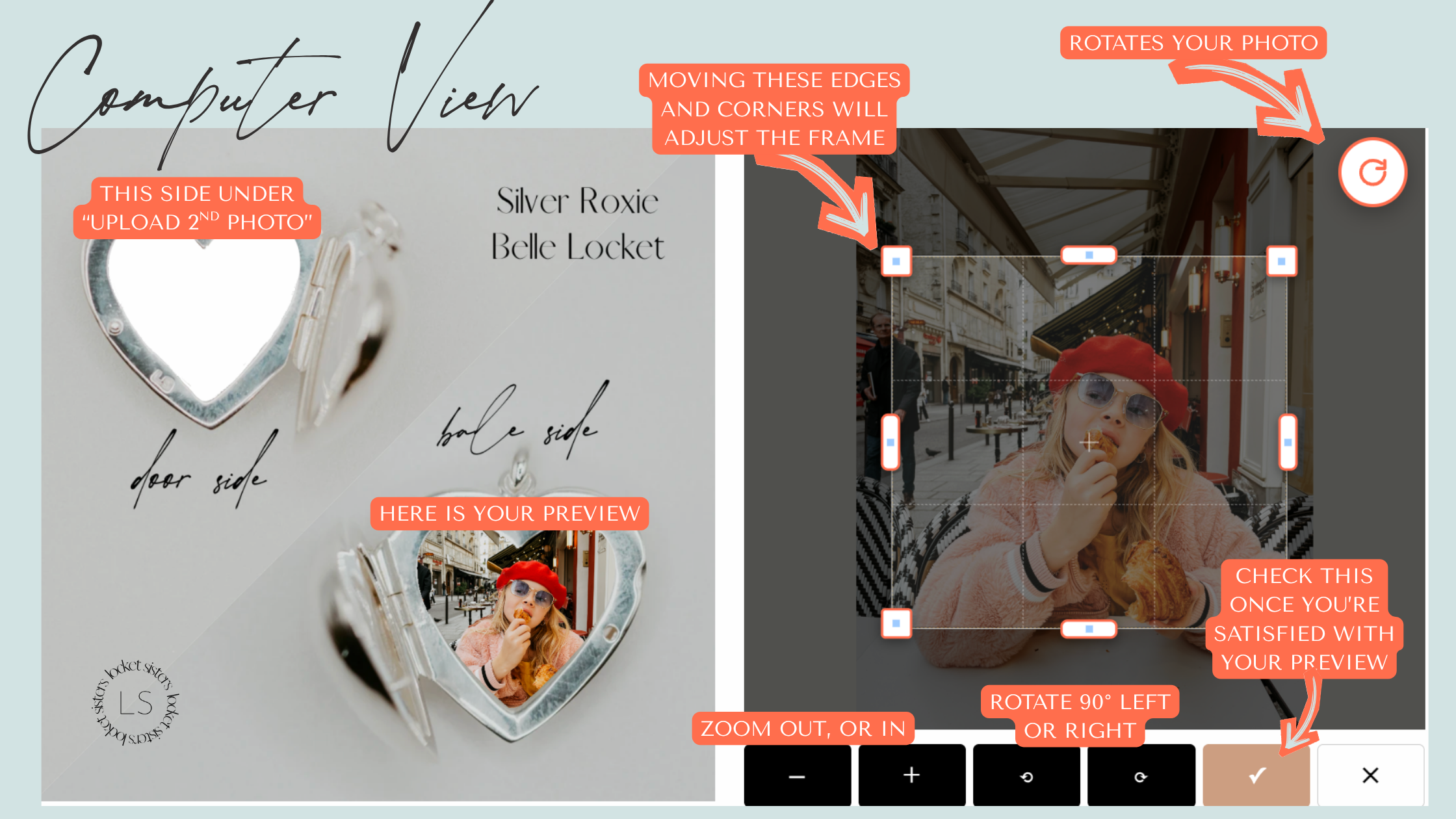
- rotate it left or right using the black boxes at the bottom
- rotate it on a 360° swivel using the red circle at the top right
- zoom in using your fingertips, or the + or - signs
- manually adjust the edges by moving the edges of the shape
- and see exactly how it will look inside your locket before it’s made.
Our preview tool lets you crop, adjust, and position your image so it fits beautifully within your chosen shape. Here is an image demonstrating what it will look like when you made adjustments on a computer.
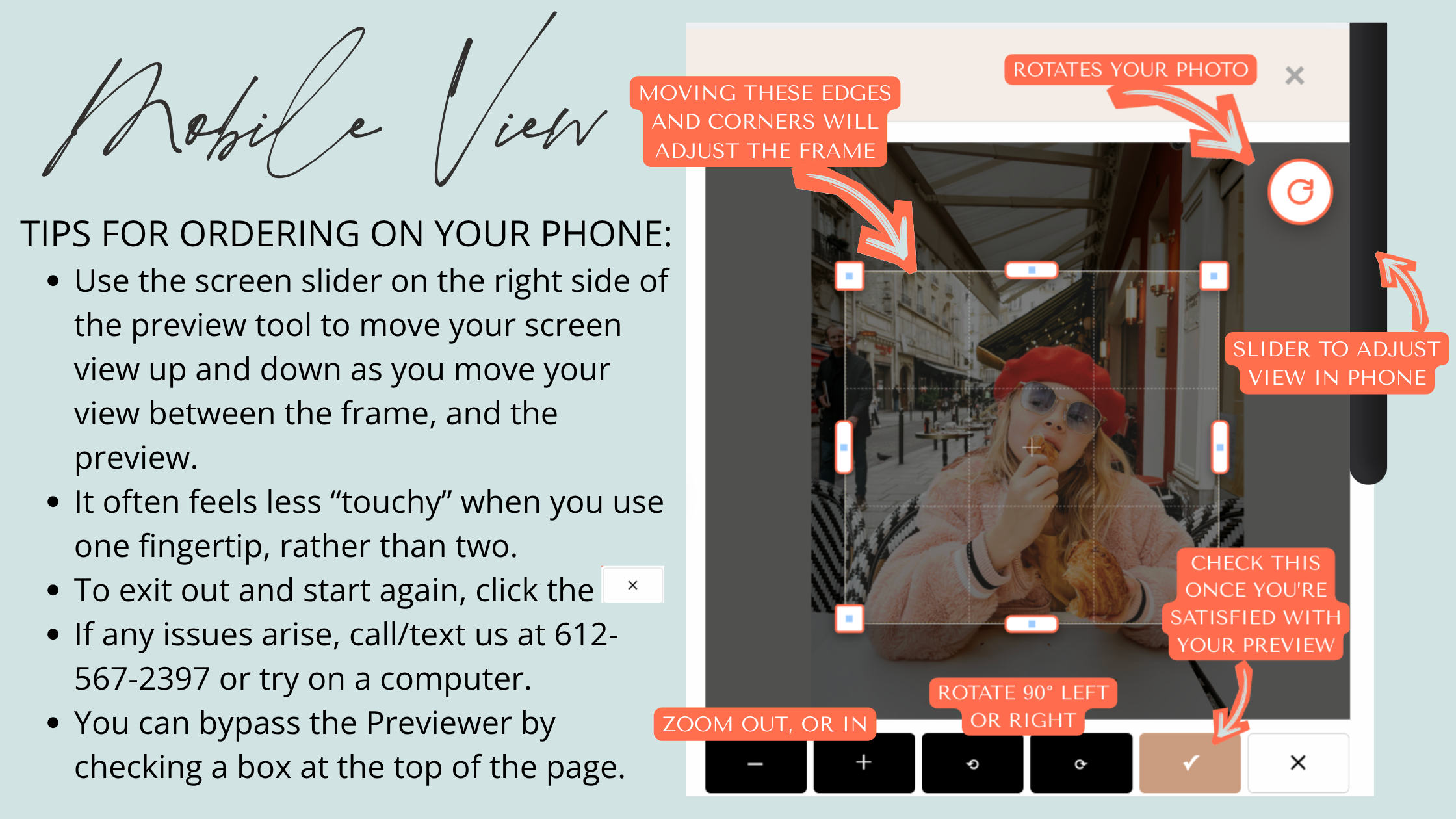
Here is an image highlighting how it works on a mobile device, like your phone. We've found that our mobile exprience was more "touchy" on the screen than making adjustments on a desktop, so we had extra rounds of improvements on this experience. While we know it may not feel intuitive for everyone who interacts with it, this version seemed to be the most universal for everyone who tested it for us.
Do I need to crop my photo before uploading?
Nope! Our Photo Preview Tool lets you crop and adjust your image directly on the site. Of course, you're welcome to change anything ahead of time if you'd like, but often having an uncropped photo makes it easier to resize it best to the locket shape you're choosing.
I don't wanna mess with the Preview Tool. Can I turn it off?
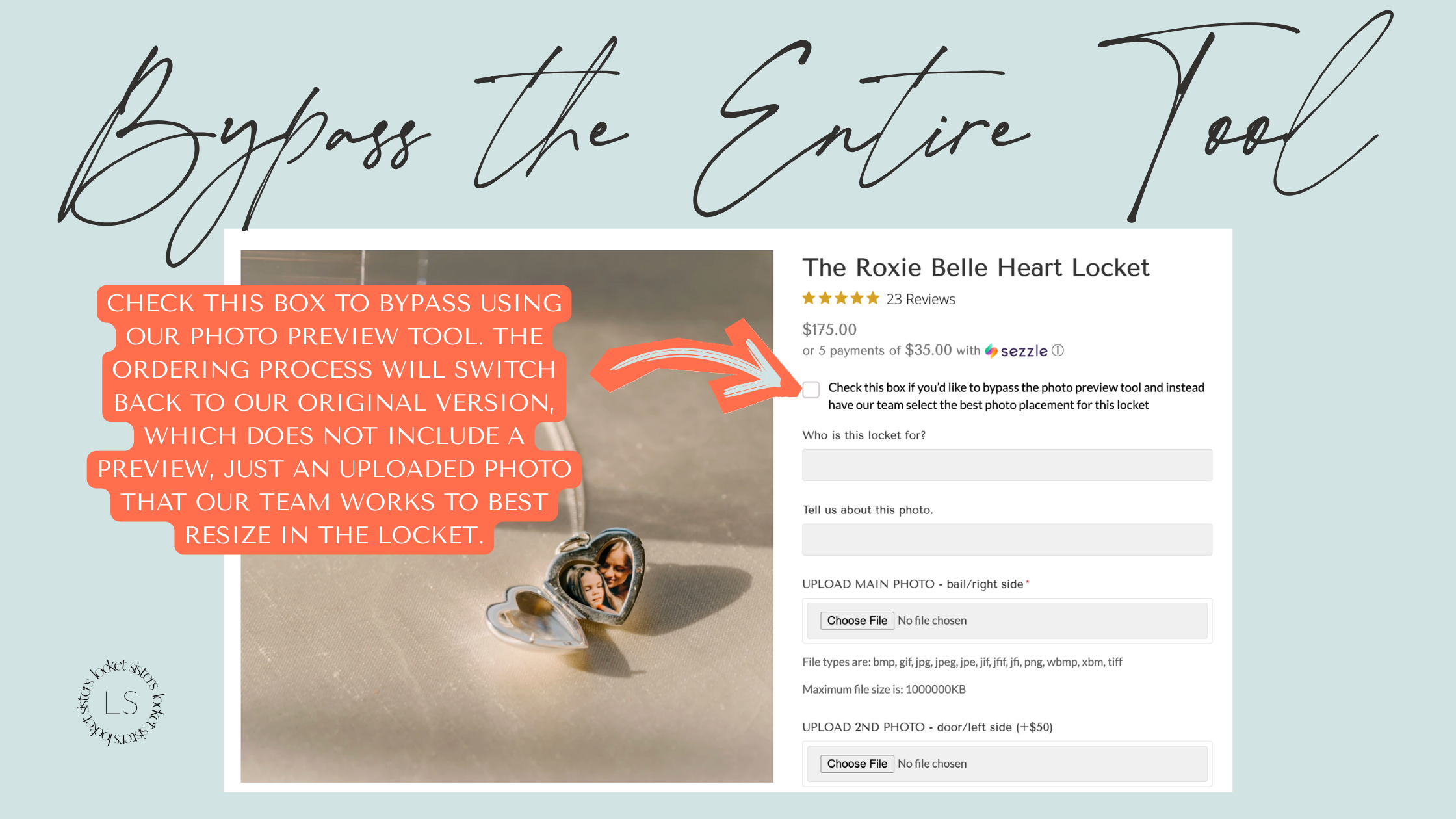
Yes! As with all smart technology, we made a "kill switch" in case you're like nah, this is not what I wanna be dealing with. After all, we've made tens of thousands of lockets without customers previewing their photo in the locket first, and (at least the vast majority of) our customers are really happy. To turn this all off, click the checkbox highlighted here.
Will my locket look exactly like the preview?
We designed the Preview Tool especially to inform how your photographs look when placed inside the locket, whcihi means we size your images so that they match how you want to see them in your locket. Despite our fancy Preview Tool, we still manually resize all images (it's either the artist in us or our lack of technology that keeps us so hands on!) which means some slight changes may be present in the final locket, and if so, it's rooted in the continued hands-on craftsmanship at the Locket Sisters. So with that long answer, we can summarize by saying yes, it will look like the preview, but maybe not EXACTLY because we're still human-powered.
Should I do this on my computer or phone?
Either one will work! We personally find it slightly easier to navigate this tool on an actually computer, like a desktop or laptop, but we worked hard to make it work on mobile, too. The video here shows you how to navigate the desktop version, and the video here shows you how to navigate the mobile version.
What kind of photos work best?
The best photos are the ones that mean the most to you. Seriously. We often get asked about resolution, but we've made tens of thousands of lockets and only a few have had a resolution that just couldn't work, which is to say, focus more on the way the photo crops and how it feels to you than the resolution of the images.
Of course, a circle locket is going to look better with a photo that can have the corners cropped out, and the heart lockets look best when the bottom corners can be removed, but that sort of thing you'll come to discover really quickly when previewing your photos in the lockets.
Can I change my photo after ordering?
If your order hasn’t entered production yet, we can still change the photos. Contact us as soon as possible and we’ll do our best to help -- text is often quickest, and that number is 612-567-2397.
Previewing Your Photo Locket Before You Order
What we're known for at the Locket Sisters is not just good craftsmanship and great customer service, but incredible photo work. We came into the locket world through photography, so with high-end portrait clients expecting high-quality print products from my sister and I, it was a no brainer that the same standards for photo work would translate into any locket we made. This means the integrity of your images remains high even when shrunk down to a tiny little fingertip-sized pictures.
Since we started back in 2017, our customers have trusted us to resize their images into their lockets mostly without previews. Every once in a while someone would request a "proof" so we'd text them a photo so they could see what it looks like. We'd always talk about adding preview for customers on the website while they're ordering, but making that happen means finding developers you trust with the backend of your website, and then paying them loads of money to work through all the kinks and eliminate as much friction in the process for you, our deal customers, in the process.
So while we've thought about this and almost hired people in the past to get it moving, we finally made the decision in the fall of 2025 to begin. We hired a developer, and they got to work on creating a preview tool for each locket's shape. Immediately they hit roadblocks about the nuance of our work and how we do it, a lengthy journey of tasks and requests and more work and more requests. We were in our Christmas rush, and then ICE came to Minneapolis (where we're based) abruptly in January 2026 and disrupted life as we knew it, and then someone burglarized our studio, and then finally FINALLY the Photo Preview Tool felt complete, and ready to share.
Like any good fool, or maybe from the wisdom of knowing life will only stop happening when we're dead, we figured we'd roll it out smack in the middle of one of our busiest time of year: The weeks before Mother's Day. On the one hand, what if it sucks and no one wants to use it at all and they hate us and don't order lockets from us anymore????? But on the other hand, what if it works out great and people who would really appreciate being able to see a preview of their locket before spending hundreds of dollars on it order because they knew what they were getting? Can't know which one it'll be, or what combo of both, 'til ya leap.
So we're launching this on April 27th, 2026, with the intent of being more available via email, phone and text in case there are issues. But also knowing you may have fewer issues since it's a good tool!
To increase the odds of ease on your end and success on ours, we've put together some tips for navigating our Photo Preview Tool that we've found noteworthy when testing it, and watching our friends and kids and selves navigate it.
If you experience persistent issues, please reach out. We'd love to keep you around, and help you.
You can fill out the form below, or call/text us at 612-567-2397, or email us at hello@thelocketsisters.com